

HOW TO MAKE A PINTEREST BOARD THAT ACTUALLY BRINGS TRAFFIC

If you want to know how to make a Pinterest board, click the plus icon on your profile, select "Board," type a keyword-rich name, and hit create. Takes thirty seconds. But a board that actually drives traffic to your website - one that shows up when your ideal clients search - requires a bit more thought than that.
Most business owners create boards the way they'd organize a personal mood board. "Inspo." "Ideas." "Work Stuff." These names mean nothing to Pinterest's search algorithm, and they mean even less to the potential client trying to find exactly what you offer.
Here's the thing: Pinterest boards function as searchable categories, not creative expressions. Your board name is keyword real estate. When someone types "morning routines for busy executives" into Pinterest search, the platform looks at board names, board descriptions, and pin content to decide what to show. A board called "Self Care" won't surface. A board called "Morning Routines for Busy Professionals" will.
With 537 million monthly active users as of Q1 2026, Pinterest is far from the "recipes and DIY" platform people dismissed years ago. For coaches, consultants, and service providers, a well-structured board strategy can send consistent traffic to your website for months - without the daily posting grind Instagram demands.
Let me show you how to create boards that actually work.
THE REAL REASON YOUR BOARDS AREN'T GETTING FOUND
Pinterest is a search engine wearing a pretty interface. Every feature - boards, pins, descriptions - feeds into how the platform decides what to show searchers. And most business owners completely ignore the searchability piece.
What happens when you name a board "My Services"?
Nothing. Pinterest has no idea what services you offer, who you serve, or what problem you solve. Neither does anyone searching.
Compare these real examples:
❌ "Inspo" → ✅ "Small Business Branding Inspiration"
❌ "Work Stuff" → ✅ "Work From Home Office Setup Ideas"
❌ "Coaching" → ✅ "Life Coaching Tips for Women in Their 40s"
The difference isn't cleverness - it's specificity. The more specific your board name, the easier Pinterest can match it to what people actually search.
Board descriptions compound this effect. Pinterest gives you 500 characters to explain what's on each board. Most creators leave this blank or write a single vague sentence. That's 500 characters of free SEO space going unused.
A wedding photographer with a board called "Portfolio" and no description will get outranked by a competitor whose board is called "Mountain Elopement Photography Colorado" with a description that mentions intimate weddings, adventure elopements, outdoor ceremony locations, and Rocky Mountain venues.
The algorithm isn't complicated. It just needs information to work with. Give it that information, and your boards start appearing in search results where your ideal clients are already looking.
How to create a Pinterest board step by step
Creating the board itself takes less than a minute. Here's exactly how to do it on desktop (which gives you more control than mobile for setup):
Step 1: Log into Pinterest and click your profile picture in the top right corner.
Step 2: On your profile page, click the plus icon, then select "Board" from the dropdown.
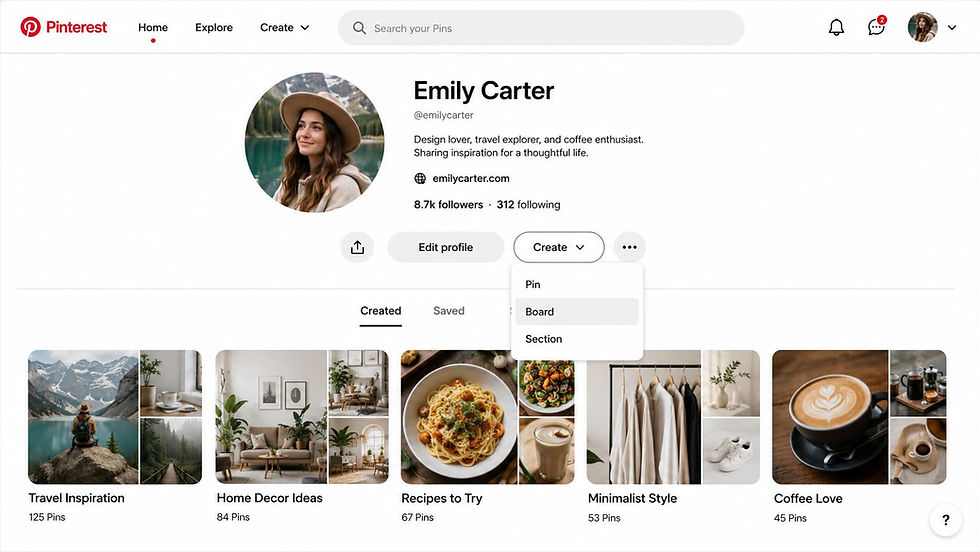
Step 3: Name your board using this formula: [Descriptor] + [Core Topic] + [For Whom/Purpose]
Examples:
- "Simple Branding Tips for Female Entrepreneurs"
- "Cozy Home Office Setup Ideas"
- "Content Marketing Strategies for Coaches"
Step 4: Choose visibility. Public boards appear on your profile and in search. Secret boards are visible only to you (useful for drafting or personal saves you don't want clients seeing).
Step 5: Click "Create."
Your board exists. Now optimize it.
Step 6: Click into your new board, then click the pencil or edit icon.
Step 7: Write a board description using all 500 characters. Include:
- One sentence explaining what someone will find on this board
- Two to three keywords your ideal client would search
- A light call to action if it fits naturally
Example for a business coach:
"Practical marketing strategies for female coaches and service providers who want to grow without burning out. Find tips on content planning, social media strategy, client attraction, and sustainable business growth. Save these ideas and start implementing today."
Step 8: Select a category from Pinterest's dropdown menu. This helps the algorithm understand where your board fits.
Step 9: Add a board cover if you want a polished profile appearance. You can select any pin already saved to the board or upload a custom image (800 x 450 pixels works well).
THE FIVE BOARDS EVERY SERVICE PROVIDER NEEDS FIRST
When you're starting from scratch, a blank profile is overwhelming. Instead of creating random boards as you save pins, build a strategic foundation first.
These five board types cover the essentials for coaches, consultants, and service-based businesses:
1. Your expertise board
This is where you establish authority. Pin your own blog content, tips graphics, and educational posts. Name it after what you actually teach.
Example: "Mindset Coaching Tips for Professional Women" (not "My Content")
2. Your portfolio or results board
Showcase your work. For photographers, that's images. For coaches, that's client testimonials, transformation stories, or case studies turned into pin graphics.
Example: "Client Success Stories - Career Coaching" (not "Portfolio")
3. The problem-aware board
Create a board around the specific problem your ideal client is searching to solve. This brings in people at the beginning of their buyer journey.
Example: "Burnout Recovery Tips for Working Moms" (not "Wellness")
4. The solution-aware board
This board targets people who already know what they need and are looking for options.
Example: "How to Hire a Virtual Assistant" (not "Business Help")
5. The inspiration board
Curated content that reflects your taste and attracts like-minded followers. This builds your brand personality without selling.
Example: "Modern Minimalist Office Inspiration" (not "Pretty Things")
Start with these five. Add more boards only when you have a clear purpose for each one. Ten well-maintained boards outperform forty scattered ones every time.
BOARD NAMES THAT ACTUALLY GET SEARCHED
Let's get specific. Here are board name templates organized by business type - plug in your niche and you have a searchable board ready to create.
For coaches:
[Type] coaching tips for [Audience]
How to [Outcome] as a [Audience]
[Problem] solutions for [Audience]
[Transformation] strategies for [Who You Serve]
Examples: "Life coaching tips for women over 40" / "How to build confidence as an Introvert" / "Career pivot strategies for corporate professionals"
For service providers (VAs, designers, consultants):
[Service] Tips for [Client Type]
How to [Task] Without [Pain Point]
[Industry] Resources for [Who Benefits]
Examples: "Social Media Management Tips for Small Businesses" / "How to Organize Your Business Without Hiring Help" / "Branding Resources for Female Entrepreneurs"
For product sellers:
[Product Category] for [Use Case]
[Adjective] [Product Type] Ideas
[Product] Inspiration for [Audience]
Examples: "Canva Templates for Course Creators" / "Minimalist Planner Ideas" / "Gift Guide for Female Business Owners"
The pattern is the same every time: be specific enough that Pinterest knows exactly who should see this board.

If you want your Pinterest presence handled professionally - from board strategy to pin creation to ongoing management - my Pinterest marketing service includes complete setup and a custom strategy built for your specific business.

HOW TO MAINTAIN BOARDS SO THEY KEEP DRIVING TRAFFIC
A board with two pins looks abandoned. A board that hasn't been updated in six months gets deprioritized by Pinterest's algorithm.
Boards updated within the last three months consistently drive higher engagement than stale ones.
Here's the maintenance rhythm that works:
Immediately after creating a board: Add 10-15 pins right away. Mix your own content (20-30%) with curated pins from other creators (70-80%). This gives the board substance and helps Pinterest understand the topic.
Weekly: Add 3-10 fresh pins to each of your active boards. Consistency matters more than volume. Five pins every week beats thirty pins once a month then silence.
Monthly: Check which boards are actually sending traffic. Pinterest Analytics shows you outbound clicks by board. Double down on what's working.
Quarterly: Audit your entire board structure. Archive boards that don't serve your business goals. Merge boards with overlapping topics. Rename boards if you've learned better keywords.
What does this look like in practice?
Say you're a virtual assistant who helps coaches with content. Your "Content Planning Tips for Coaches" board might get 15 saves weekly while your "Productivity Hacks" board gets almost nothing. That's data. Pin more content to what's working. Consider archiving or renaming what isn't.
The goal isn't to have the most boards. It's to have boards that consistently surface in searches and send people to your website. Everything else is decoration.
For deeper strategy on making Pinterest work as a traffic source, this guide on using Pinterest for business breaks down the full approach.
SECRET BOARDS AND WHEN TO USE THEM FOR BUSINESS
Secret boards aren't just for hiding personal saves from clients. They're a strategic tool when used correctly.
Use secret boards for:
Content staging. Build out a new board behind the scenes. Add pins, write the description, choose a cover - all while it's invisible. When it's polished and substantial, flip it to public. First impressions matter.
Competitor research. Save pins from accounts you're studying without those pins appearing on your public profile. You can analyze their pin designs, descriptions, and board structures without advertising that you're watching.
Client inspiration. If you're a designer or coach working with clients, create secret boards to gather ideas specific to their project. Share the board with them directly (you can add collaborators to secret boards) without cluttering your public profile.
Personal saves that don't fit your brand. You're allowed to use Pinterest for personal interests. Keep those separate from your business presence with secret boards.
To convert a secret board to public:
Click into the board → Edit board → Toggle off "Keep this board secret" → Save.
All pins on that board immediately become visible on your profile and in Pinterest search. Plan accordingly.
THE COMMON MISTAKES THAT MAKE BOARDS INVISIBLE
After seeing thousands of Pinterest profiles, these errors show up constantly:
Mistake 1: Generic board names
"Ideas," "Stuff I Like," "Business" - these mean nothing to the algorithm and nothing to searchers. Every board name should pass the test: would my ideal client type this into Pinterest search?
Mistake 2: Empty or near-empty boards
A board with three pins signals abandonment. Pinterest won't prioritize showing it. Either fill a board properly (10+ pins minimum) or delete it until you have content to add.
Mistake 3: Blank descriptions
You have 500 characters. Use at least 200 of them. Include keywords naturally. This is free optimization most people skip entirely.
Mistake 4: Too many boards with no clear focus
Fifty boards about vaguely related topics dilutes your profile. Ten boards with clear, distinct purposes builds authority. Quality over quantity.
Mistake 5: Relying on group boards
Group boards (collaborative boards with multiple contributors) used to be a growth strategy. Pinterest's algorithm now deprioritizes them heavily. Solo boards with consistent, niche content outperform scattered group boards for business accounts.
Mistake 6: Never updating after initial creation
Pinterest rewards recency. A board you created two years ago and never touched again will slowly disappear from search results. Regular pinning keeps boards active in the algorithm.

FREQUENTLY ASKED QUESTIONS ON HOW TO MAKE A PINTEREST BOARD (FAQ)
What is the difference between a Pinterest pin and a board?
A pin is a single piece of content - an image or video with a link, title, and description. A board is a collection that holds pins. Think of boards as folders and pins as the individual files inside them. You create boards to organize your pins by topic, and each pin you save or create lives on one or more boards.
How do I add stuff to my Pinterest board?
You have two options. First, when browsing Pinterest, click the save button on any pin and choose which board to save it to. Second, create your own pins by clicking the plus icon, uploading an image, adding a link and description, then selecting the destination board. You can also save pins directly from websites using the Pinterest browser extension.
How does a Pinterest board work for business?
Each board acts as a searchable category on your profile. When someone searches Pinterest for a topic, the platform looks at board names, board descriptions, and the pins inside to determine what to show. A well-named board with relevant pins can surface in search results and drive traffic to your website. Boards also help organize your content so visitors can quickly find what interests them.
Can I make a board a section of another board?
Yes - Pinterest has a feature called board sections. Inside any board, you can create subsections to organize pins further. For example, a "Website Design Tips" board might have sections for "Homepage Design," "About Page Examples," and "Contact Page Ideas." Sections don't show up in search separately - they're purely organizational within the parent board.
What happens if I delete a Pinterest board?
Pinterest keeps deleted boards for 7 days before permanent removal. During that window, you can restore the board from your profile settings. After 7 days, the board and all its pins are gone permanently. If you're unsure, archive the board instead - it becomes invisible to others but you keep all the content.
How many boards should I have on Pinterest?
There's no perfect number, but quality matters more than quantity. For service providers and coaches, 10-15 well-maintained boards typically outperform 40+ scattered ones. Start with 5 essential boards, then add new ones only when you have a clear purpose and enough content to make them substantial (10+ pins minimum).
The boards that actually build your business
Creating a Pinterest board takes thirty seconds. Creating boards that consistently drive traffic to your website takes intention.
The difference between a Pinterest profile that works and one that sits dormant comes down to three things: strategic board names that match what your audience searches, descriptions that give Pinterest context, and consistent pinning that keeps your boards active in the algorithm.
Most business owners treat boards as an afterthought - random collections they throw pins into without structure. That approach builds a cluttered profile that impresses no one and converts even fewer.
The service providers seeing real results from Pinterest approach it differently. They name boards like keywords. They write descriptions like mini sales pages. They maintain their boards like assets - because that's what they are.
If you want to skip the learning curve and have your entire Pinterest presence built strategically from the start, my Pinterest marketing service handles everything. The strategy package ($699) gives you a complete board structure, keyword research, and pin templates. The full setup ($1,299) includes ongoing management so you can focus on your business while Pinterest drives traffic in the background.
Your boards are searchable real estate. Build them like it matters - because for your business, it does.
----
Let me know in the comments below if you want me to cover any branding or marketing topics in more depth, and I’ll make sure to create a blog post about it in the future.


Comments